

A modern iPhone can produce excellent photos and video without a bag full of kit. The right iPhone camera accessories simply deal with the problems the phone cannot fix alone: shaky footage, poor light, flat sound, limited battery life and nowhere safe to keep your files. Buy for the way you shoot, rather than adding accessories because they look professional.
For many people, a protective case, compact tripod and dependable power bank will make a bigger difference than an expensive lens attachment. If you film regularly, travel often or create content for work, adding a light, microphone and storage solution can turn a phone into a practical camera setup.
Start with the limitation you want to solve
Before comparing brands or prices, think about the photos and videos you miss. Blurred family shots indoors need more light or better support. Walking videos need stabilisation. Long days away from a plug socket need battery capacity. Interviews, tutorials and holiday clips often benefit more from clear audio than another camera effect.
The iPhone model matters too. Camera layouts, button positions and connector types vary. iPhones with MagSafe can use compatible magnetic mounts and grips, but a thick case or a case without a strong magnetic ring can reduce holding power. USB-C iPhones make connecting newer drives, card readers and microphones more straightforward, while Lightning models may need an appropriate adapter and, in some cases, additional power.
Keep the camera clear with the right case
A case is not usually thought of as camera equipment, but it is the accessory used every time you take the phone out. Choose raised edges around the camera housing to reduce contact with tables and other hard surfaces. Make sure the cut-outs do not shadow the lenses or interfere with flash performance.
If you use a tripod mount, a magnetic wallet or a clip-on lens, check that the case is compatible before buying. Ultra-rugged cases provide useful protection for commuting and travelling, although their extra depth can make some clamp mounts less secure. A slimmer case is often easier to use with a gimbal or stabiliser.
iPhone camera accessories that make a visible difference
Tripods, grips and mounts for sharper results
A tripod is one of the best-value additions for iPhone photography. It helps with night mode, self-portraits, group photos, time-lapse clips and product images, where a small movement can make a photo look less sharp. Look for a phone clamp with padded grips, a secure locking mechanism and enough width for your iPhone with its case fitted.
For desktop calls, recipe videos or online selling, a small tabletop tripod is usually enough. For outdoor landscapes, sports events or standing talking-head video, a taller tripod offers more flexibility. A compact grip with a built-in stand can be useful for everyday shooting, but it will not replace a solid tripod in windy conditions.
Gimbals add powered stabilisation for moving video. They are useful for walking tours, property videos and smooth pans, but take longer to set up and need charging. For casual clips, the iPhone's built-in stabilisation and a simple grip may be better value. Choose a gimbal when smooth movement is central to the video, not just because it is another device to carry.
Portable lighting for indoor photos and video
Phone cameras cope well in daylight, but indoor lighting can create grain, harsh shadows and mixed colours. A small LED light gives you control over the direction and brightness of light, particularly for video calls, close-up product shots, makeup tutorials and food photography.
A light with adjustable brightness is more useful than a fixed-output model. Adjustable colour temperature is worth considering if you shoot in different rooms: warmer light can suit a living room scene, while cooler light may match daylight near a window. Avoid placing a bright light directly beside the lens for every shot. Moving it slightly to one side often gives faces and objects more shape.
Ring lights are popular for front-facing video because they give even illumination, but they can look flat for wider scenes. A compact panel light is more versatile if you photograph products, people and places rather than only filming yourself.
Lenses: useful, but not essential
Clip-on and case-mounted lenses can offer wider views, closer macro detail or a different visual style. They can be useful for specialist work, especially if your iPhone model lacks a particular focal length. However, they are not an automatic upgrade.
A poor-quality lens attachment can soften corners, cause glare or sit slightly off-centre over the iPhone camera. That is particularly noticeable in bright sunlight and on high-resolution photos. Buy an attachment designed for your phone or a mount system that holds the lens precisely in place. Clean both the iPhone lens and the attachment before shooting, as a small fingerprint can spoil the result.
For most users, learning when to use the built-in ultra-wide, standard and telephoto cameras will provide better results than adding inexpensive lenses. A dedicated macro attachment is the exception if you regularly photograph small items, crafts or detail work.
Microphones for video people will actually watch
Viewers will accept a slightly imperfect video sooner than muffled or noisy sound. A compact wired or wireless microphone can improve interviews, voiceovers, demonstrations and social clips, particularly outdoors or in echoey rooms.
Check the connection before you buy. USB-C microphones suit newer iPhones, while Lightning-compatible models or suitable adapters may be required for older devices. Wireless systems give more freedom when the speaker is away from the phone, but they introduce batteries, pairing and another item to charge. A simple wired microphone is often the most reliable option for close-range recording.
Power banks and charging cables for longer shoots
Video recording, screen brightness, mobile data and editing quickly drain an iPhone battery. A power bank is a practical camera accessory for a day out, a festival, a work event or a holiday. Capacity matters, but so does output. Choose a model with USB-C Power Delivery if you want faster charging on compatible iPhones.
Magnetic battery packs are convenient for short top-ups and light use, although they can charge more slowly and may warm up during extended recording. A wired power bank normally provides better efficiency and is the sensible choice for long video sessions. Pack a quality cable of the correct type as well. A spare cable takes little space and prevents a flat battery from ending the day early.
Storage and transfer accessories for iPhone video
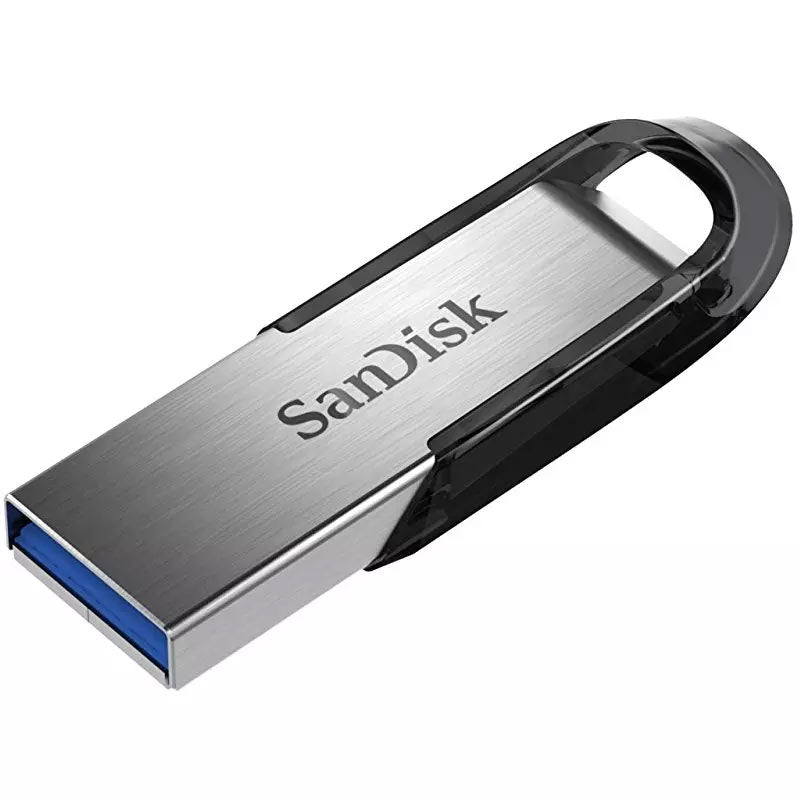
Photos and video can fill an iPhone quickly, especially when recording 4K footage. A dependable backup routine is more useful than waiting for the storage warning to appear. USB-C iPhones can work with compatible external SSDs, USB flash drives and card readers, making it easier to copy files without relying entirely on cloud storage.
For demanding recording, speed is as important as capacity. iPhone 15 Pro and iPhone 15 Pro Max models can record certain high-bitrate ProRes formats directly to supported external storage, but the drive and cable must be fast enough. A low-cost cable intended only for charging may limit transfer performance. Check the drive's stated speed, connector and power requirements before relying on it for recording.
An external SSD is a good choice for regular video work because it offers high capacity and quick transfers in a compact format. Keep it protected in a case and use a short, reliable cable to reduce strain on the phone port. For occasional photo transfer, a smaller USB flash drive may be enough. Card readers are useful if you also use a digital camera, drone or action camera and want to move files between devices.
Lightning iPhones can transfer files with suitable adapters, but compatibility can be more restrictive and some storage devices may need extra power. If you have an older model, check the accessory description carefully rather than assuming every USB drive will work directly.
Build a kit around how you use your iPhone
For everyday family photos and holidays, start with a protective case, compact tripod and power bank. This setup covers the common problems of dropped phones, group shots and low battery without taking up much space in a bag.
For social video, add a small LED light and a microphone. The light improves indoor image quality, while the microphone makes speech clearer. A gimbal is worth considering only if you regularly film while moving.
For product photography or online selling, a tripod and adjustable light are the priorities. Consistent framing and lighting make listings look cleaner and save time when editing. A macro lens may help with small details, but it should come after the basics.
For serious mobile video, use stable support, an external microphone, a high-output power bank and external storage where your iPhone supports it. This costs more, but each item has a clear job and can prevent a shoot being interrupted by battery, storage or audio issues.
What to check before buying
Compatibility is the first check. Confirm your iPhone model, whether it uses Lightning or USB-C, and whether you normally shoot with a case fitted. Then compare the specification that affects the accessory's real-world use:
- Mounts should state their supported phone width and whether they work with cases.
- Magnetic accessories need MagSafe compatibility or a compatible magnetic case.
- Power banks should list capacity, USB-C output and included or required cable type.
- Drives and card readers should state their connector, transfer speed and any power requirements.
- Microphones should confirm iPhone compatibility, connection type and whether an adapter is included.
The best camera kit is the one you will take with you. Start with the accessory that removes your biggest frustration, test it on an ordinary day, and add more only when your photos or videos genuinely need it.
