

A camera can be ready for a full day of shooting, but the wrong memory card can stop it after a few bursts or leave video recording unavailable. The best SD card for camera use is not simply the one with the biggest capacity or the highest number on the label. It needs to match your camera’s card slot, the way you shoot and the file sizes you create.
For family photos and holiday snaps, a dependable UHS-I card from a recognised brand is usually all you need. For mirrorless cameras shooting continuous RAW bursts or 4K video, write speed matters far more. Buying the right card means paying for useful performance, rather than capacity or speed your camera cannot use.
Choosing the best SD card for camera use
Start with your camera manual or its specifications page. Check whether it takes a full-size SD card, a microSD card, or a different format altogether. Most compact cameras, DSLRs and mirrorless cameras use full-size SD cards. Some action cameras, drones and small compact cameras use microSD cards instead.
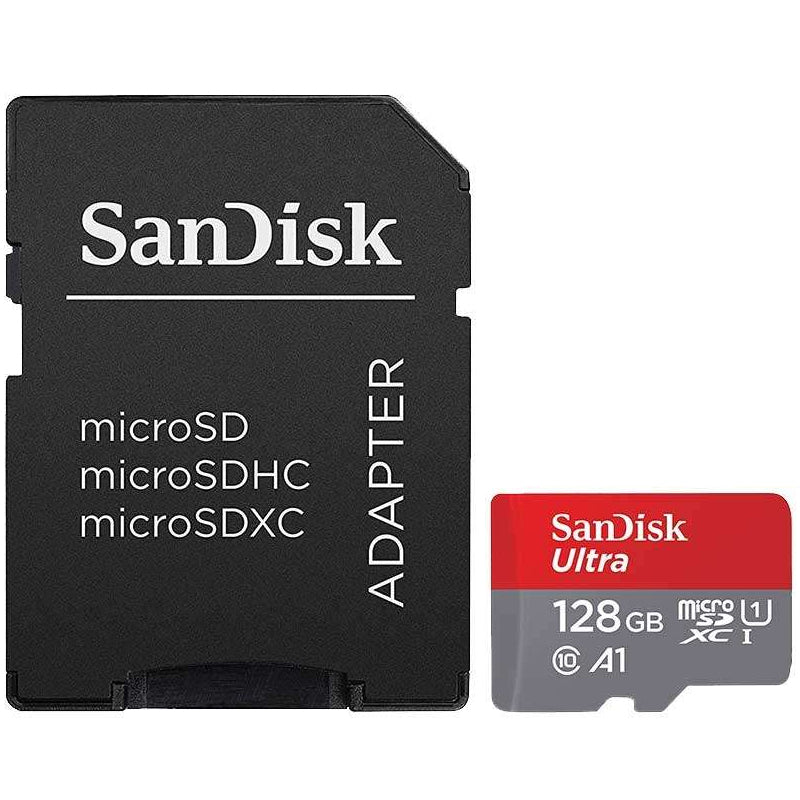
A microSD card can be used in a full-size SD slot with an SD adapter, but a standard SD card cannot fit a microSD slot. For regular camera use, a full-size card is often the more convenient option because it is easier to handle and less likely to be misplaced. Use microSD only where the device requires it, or where you want one card to work across a drone, action camera and compatible camera body.
Also check whether your camera supports SDXC and UHS-II. SDXC covers cards above 32GB and is supported by most modern cameras, but it is always worth checking on older models. A UHS-II card will work in many UHS-I cameras, yet it will only run at UHS-I speeds. That can make a UHS-II card poor value unless your camera has a UHS-II slot or you need the faster transfer speeds when copying files to a compatible card reader.
Read speed versus write speed
Card packaging often leads with a high read speed, such as 170MB/s or 300MB/s. Read speed affects how quickly you can copy photos and footage from the card to a computer using a suitable reader. It is useful, especially after a large shoot, but it does not tell the whole story.
Write speed is the key figure for shooting. This is how quickly your camera can save images or video to the card. A card with a strong sustained write speed lets the camera clear its buffer faster, so you can keep shooting burst images. It also helps prevent recording from stopping when filming at higher resolutions or bitrates.
For this reason, do not choose solely on the largest speed figure printed on the front. Look for the speed class symbols as well. They provide a clearer guide to the card’s minimum performance during recording.
Understanding SD card speed classes
For stills photography, Class 10 is the sensible minimum. It supports a minimum write speed of 10MB/s and is suitable for everyday photo use. Most current branded camera cards are Class 10, so this is a basic starting point rather than a premium feature.
UHS Speed Class is marked with a U inside a symbol. U1 supports a minimum write speed of 10MB/s, while U3 supports at least 30MB/s. A U3 card is a good all-round choice for many 4K-capable cameras and for photographers who use continuous shooting.
Video Speed Class is marked with a V. V30 guarantees at least 30MB/s sustained writing and is the practical choice for many cameras recording 4K video. V60 guarantees 60MB/s, while V90 guarantees 90MB/s. These higher classes are designed for demanding professional video formats, high bitrates and cameras that create very large files.
Your camera’s manual should state its recommended speed class for each video mode. If it calls for V60, a V30 card may still take photographs perfectly well, but it may not support every recording setting. Match the card to the most demanding mode you genuinely use.
Best SD card for camera jobs
Everyday photography and compact cameras
For portraits, travel photos, family events and general compact-camera use, choose a branded 64GB or 128GB UHS-I SDXC card with Class 10 and U1 or U3 performance. This gives comfortable space for JPEGs and moderate RAW shooting without spending more than necessary.
64GB suits occasional use and is a sensible option if you prefer to transfer and back up photos regularly. 128GB offers more flexibility for a week away, a busy event or a camera that shoots high-resolution images. Reliability and compatibility should take priority over headline speed in this category.
Mirrorless and DSLR photography
Modern mirrorless and DSLR cameras can produce large RAW files, particularly models with high-resolution sensors. They also fill the camera buffer quickly when shooting sports, wildlife or fast-moving children. A UHS-I U3 or V30 card is a solid choice for many enthusiast cameras.
If your camera supports UHS-II and you regularly shoot long RAW bursts, choose a UHS-II card with the speed class your camera recommends. It can reduce the time spent waiting for the buffer to clear and make a noticeable difference during action shooting. It costs more, so it is best reserved for cameras and shooting styles that benefit from it.
4K video and content creation
For standard 4K recording, V30 is commonly the right place to start. It provides the sustained write performance required by many cameras, action cameras and hybrid mirrorless models. Check the camera’s bitrate and recording requirements, because 4K is not one fixed level of demand.
Higher-quality 4K modes, All-I recording, high-frame-rate footage and some 6K or 8K settings can require V60 or V90 cards. A V90 card is not automatically the best choice for every videographer. If your camera only asks for V30, the extra spend may bring no benefit in-camera. Put that budget towards a spare card, battery or reliable backup drive instead.
Action cameras, drones and microSD devices
Action cameras and drones usually need microSD cards, often with U3 and V30 ratings for 4K recording. Choose a card that is specifically rated for sustained video recording and buy from a recognised brand. These devices can create heat and write continuously for long periods, which makes consistent performance more useful than an inflated maximum read-speed claim.
A microSD card with an adapter is useful if you want to copy footage through a standard SD card reader. Keep the adapter with the card or in a protective storage case, as they are easy to lose.
How much SD card capacity do you need?
Capacity affects convenience, not camera speed. The right size depends on image format, resolution, video quality and how often you transfer your files. JPEG photos take less room than RAW files, while 4K video can use space quickly.
A 32GB card can be enough for light JPEG photography, but 64GB is generally a better minimum for a current camera. 128GB is the most flexible choice for many photographers, giving room for RAW images and shorter 4K clips. Choose 256GB or more if you record extended video, travel without a laptop or shoot high-resolution RAW files.
There is a trade-off with very large cards. One 512GB card means fewer card changes, but it also places more images on a single item. Some photographers prefer two or three 128GB cards, changing cards during the day and keeping separate shoots apart. This can make organisation and backup simpler, particularly on a trip or paid job.
Buy genuine cards and protect your files
Memory cards are small, easy to replace and often asked to hold irreplaceable images. Stick to recognised brands such as SanDisk, Samsung and Kingston, and buy from a specialist retailer that clearly states capacity, format and speed class. Unusually cheap cards from unknown sellers can be counterfeit, incorrectly labelled or unreliable at their claimed capacity.
Format a new card in the camera before first use, once you have confirmed that it is empty. Formatting in-camera creates the file structure your camera expects. Afterwards, transfer files promptly, keep at least one additional copy, and only format the card again after checking that your backup has completed.
Avoid filling a card to its last few megabytes before an important shoot. Carrying a spare is inexpensive insurance, and a protective case keeps cards dry, labelled and less likely to disappear into a camera bag.
The best choice is the card that your camera supports at the speed your shooting requires, with enough capacity to finish the job comfortably. Select that match first, then keep a spare close by so a full card never ends the day early.
